
 Iniciar sesión
 ES
ES
 English
 中文 / 汉语
 Español
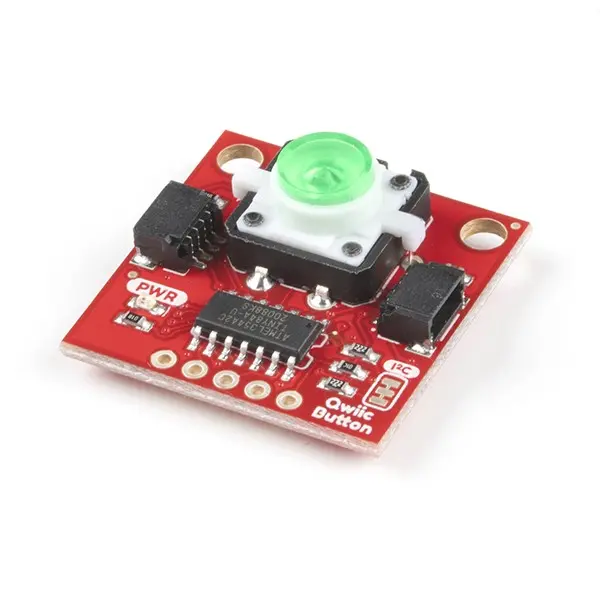
Imagen de referencia - consulte las especificaciones del fabricante


Atributo del producto
Valor del atributo
Seleccionar atributo
Productos Encontrados: 0

Proveedor:
SparkFun Electronics
Nº de pieza:
BOB-16842
RoHS:
Yes
HTS:
9027102000
COO:
US
ECCN:
EAR99
Embalaje estándar del proveedor 
1
Buttons are an easy and tactile way to interface with your project, but why would you want to deal with debouncing, polling, and wiring up pull-up resistors? The Qwiic Button with built-in green LED simplifies all of those nasty worries away into an easy to use I2C device! Utilizing our Qwiic Connect System, using the button is as simple as connecting a cable and loading up some pre-written code!
If you need multiple buttons for your project, fear not! Each button has a configurable I2C address, so you can daisy-chain multiple buttons over Qwiic and still address each one individually. We\'ve got an example in our [Arduino library](https://github.com/sparkfun/SparkFun_Qwiic_Button_Arduino_Library) that provides a super-easy way to configure your Qwiic Button to whatever I2C address you desire. You can download the library through the Arduino library manager by searching \'SparkFun Qwiic Button\' or you can get the GitHub repo as a .zip file and install the library from there.
In addition to handling blinking and debouncing, the Qwiic Button has configurable interrupts that can be configured to activate upon a button press or click. We\'ve also taken the liberty of implementing a [FIFO queue](https://en.wikipedia.org/wiki/Queue_(abstract_data_type)) onboard the Qwiic Button where it keeps an internal record of when the button was pressed. This means that code on your microcontroller need not waste valuable processing time checking the status of the button but instead can run a small function whenever the button is pressed or clicked! For more information on interrupts check out [our guide here](https://learn.sparkfun.com/tutorials/processor-interrupts-with-arduino/all)!
***
*The SparkFun [Qwiic](https://www.sparkfun.com/qwiic) Connect System is an ecosystem of I2C sensors, actuators, shields and cables that make prototyping faster and less prone to error. All Qwiic-enabled boards use a common 1mm pitch, 4-pin JST connector. This reduces the amount of required PCB space, and polarized connections mean you can’t hook it up wrong.*
***
->
Palabras clave de búsqueda:
BOB16842
EN STOCK:
0
Cantidad mínima de pedido:
5
Plazo de entrega de fábrica
2 Semanas
Precio (USD)
Cantidad
Precio unitario
Precio total
5
$8.46
$42.30
25
$6.88
$172.00
50
$6.86
$343.00
100
$6.57
$657.00
250
$6.03
$1,507.50
500
$6.01
$3,005.00
1.000
$5.87
$5,870.00
2.500
+
$5.64
$14,100.00
Haga clic para solicitar una cotización
Guías de productos
 Learn more about SparkFun Qwiic Connect System
© 2026 ECCO GROUP